

...
Autoscaling
Don't be afraid to scale.
...so this past year alone, i have spent about ~$30K of my own capital testing / learning/ perfecting virtual hardware scaling & sizing in the cloud...
essentially running load tests multiple times a day for over a year, and counting...
...running the buzzwords.news big data analysis...that produces the results displayed on this site daily...
i made many mistakes, that can save others time & money, so i'll contribute back a lil bit of what i learned throughout this process to help others trying to scale in the cloud.
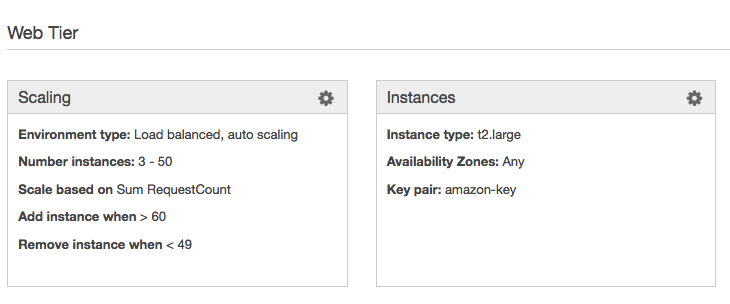
Here are the Amazon AWS Elastic Beanstalk Autoscaling settings i ended up with....now....please allow me to explain;
Important Questions to Answer:
- Why is Number of instances set to 3 - 50 ?
- Why are we scaling based on RequestCount (and not some other metric like Network in, or Max CPU) ?
- What does the traffic pattern look like?
- How many requests can each server handle? (without any server falling down nor the whole cluster falling down)
Success Criteria::
- Absolutely 0 (NO!) 50x errors
- Acceptable response codes: 20x, 30x, 40x
- Response time under 7 seconds per GET or POST transaction
- The existing infrastructure MUST be able to hold the traffic till Autoscaling kicks in, and additional resources are deployed and fully functional to ensure no service interruption. (Hint: This is where individual instance sizing comes into play and minimums are defined.)
Success Metrics::
Response time:
- # of Requests per peak min, hour
- # of Requests distributed per server
Establishing the BaseLine::
Autoscale min 3 to max 50, wide scope to allow the scaling activity to naturally stabilize within the range. The goal is never to reach the top, rather float comfortably beneath the max, especially during peak times while never falling beneath the minimum amount of healthy nodes in the cluster. For example, within a 3 to 50 node cluster, Autoscale peak at ~20, and scale down back to minimum High Availability requirement of 3 during normal operation times. This methodology will ensure that you do not "choke" and run out of processing power. If you maxed out your Autoscaling group, you will hit a wall and start to see 50x errors of service not available.
Each node in the cluster should comfortably handle the relative amount of requests designated based on individual instance processing power, while the collective total amout of nodes in the cluster should be able to comfortably handle the peak of traffic within autoscale mid range of hot servers at any given time over a long period of time.
Real world example;
1 request = max 512MB ram & 7 seconds vCPU time
The Scaling Point:
Notice; at peak minute, we have ~250 max requests.
The Scaling Point, is triggered @ ~55 requests per minute, the moment the graph begins to climb...
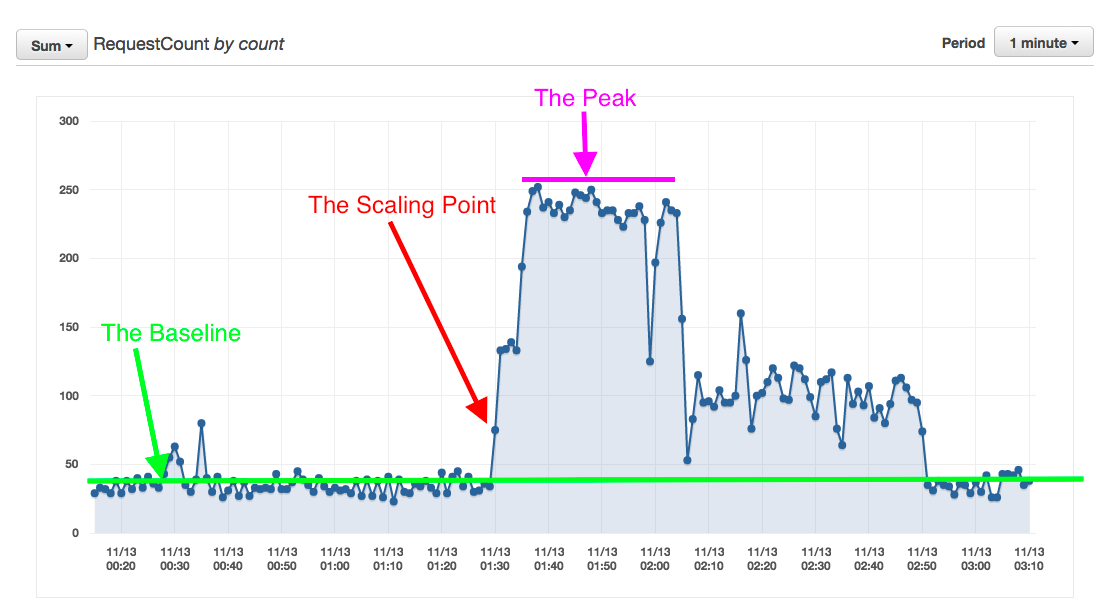
The Baseline :: Normal Traffic:
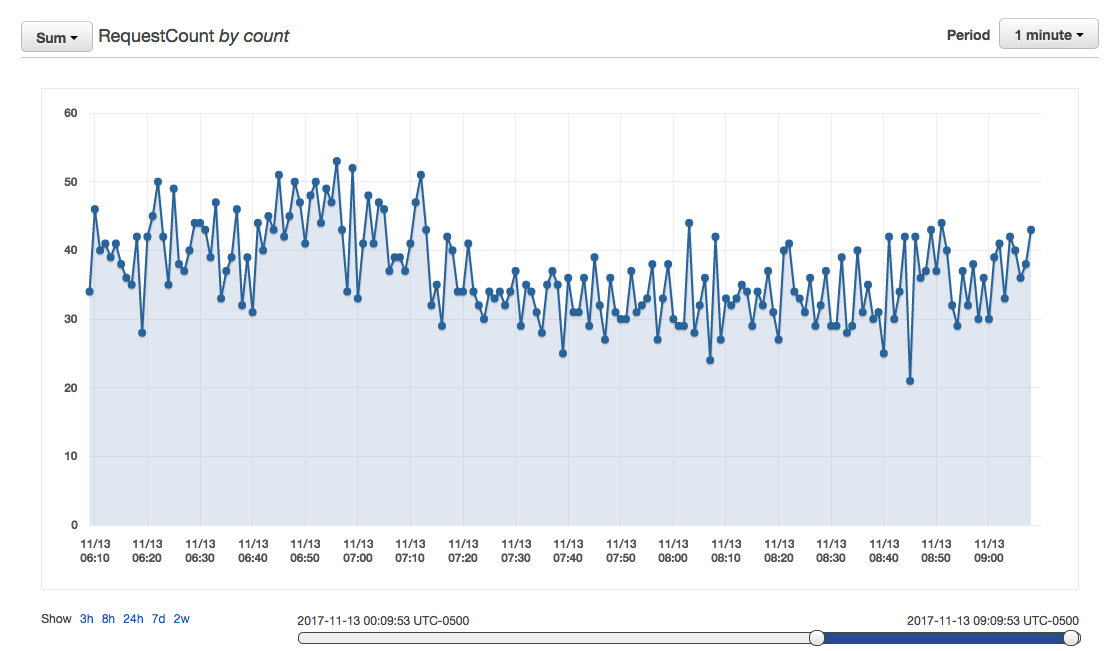
At peak, the Autoscaling group stabilized at 12 servers;
Which means...
Conclusion::
12 x t2.large = 24 vCPU cores & 96GB RAM
(1 x t2.large = 2 vCPU cores & 8GB RAM)
~250 requests / 12 servers = ~21 requests handled per server per minute
1 minute = 60 seconds
60 seconds / 21 requests = ~3 seconds per transaction:: full request / response || GET + POST (Form Submit or API) + process POSTBACK
Therefore if 1 server instance handles 20 requests per minute,
then 3 servers (minimum HA) can handle 60 requests per minute,
therefore i should set my Autoscaling Trigger to scale up when # of requests are > greater then 60 requests per minute,
and scale back down when # of requests < are less than 40 (2 x 20 requests per instance) so that the HA minimum of 3 nodes can survive a failure of at least 1 node during peak minute (at least 2 out of 3 always up spread across different availability zones / data centers).
Excellent! Great Successss!
Resilient, Self Healing, High Performance, Fault Tolerant, AutoScalable Architecture.
This same method of establishing a baseline can be applied when sizing any system and looking for "the choking point" and "the comfort zone".
In a virtual environment it is easy to set max well above required capacity, that's what the cloud was designed for, so do not fear to scale.
Once you have perfected your HA Autoscaling you can continue to tweak your instance sizes vertically or instance quantity horizontally to be as cost efficient as possible.
Then after measuring and tweaking over an extended period of time, weeks of stability, you are ready to reserve instances and save money...
An Example of Bad Sizing
Notice how we suffered degradation of service when the health status reached "Severe"...
This should never happen...this means that the instance sizes x the minimum amount of instances, in our case 3 x t2.x was not sufficient to hold the load while the additional instances where scaling up because the load increased faster then the speed of scaling...
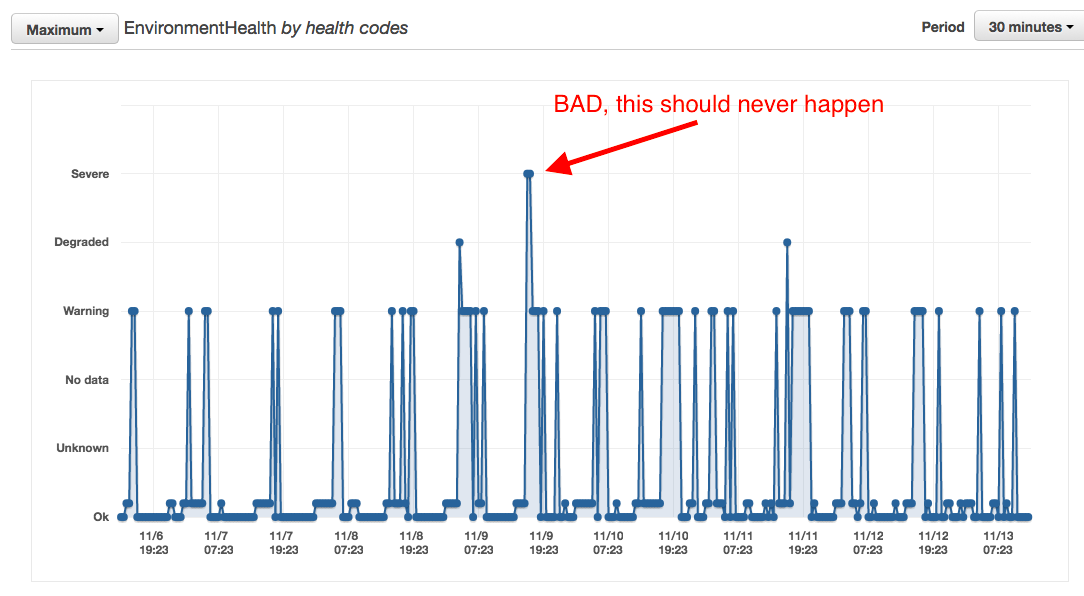
The Scaling Speed, the time it takes to warm instances and autoscale is just as important as the other metrics...your minimum environment, must be able to hold the load till autoscaling deploys re-enforcements.
Now it's time to continue to tweak code to improve performance within your application to further reduce transaction footprint & enhance your application, freeing up time to focus and let innovation happen.
I hope you found this valuable...if you did, i am happy =]
...use, enjoy, like & share as you see fit...
If you did not like, please tell me why, i want to learn...find me please & reach out.
If you have something to add or any feedback please share.
Thank you,
jacob
(...working on it....)
- Log in to post comments